A Shark DuoClean vacuum losing suction usually points to one culprit: buildup on the brush rolls, in the dust bin, or inside the filter. Hair, dust, and fibers quietly accumulate over time and slowly choke performance. The fix is faster and easier than most people expect, and you don’t need special tools or expensive service. Just a few minutes of focused care restores full cleaning power.
This guide covers every essential step: removing and cleaning the front soft roller, maintaining the non-removable rear brush, emptying and dry-wiping the dust bin, and caring for the HEPA filter. You’ll also learn what to avoid, such as water on the dust bin, and how to troubleshoot common issues like a stubborn red indicator light. Follow this routine to keep your Shark DuoClean vacuum running like new for years.
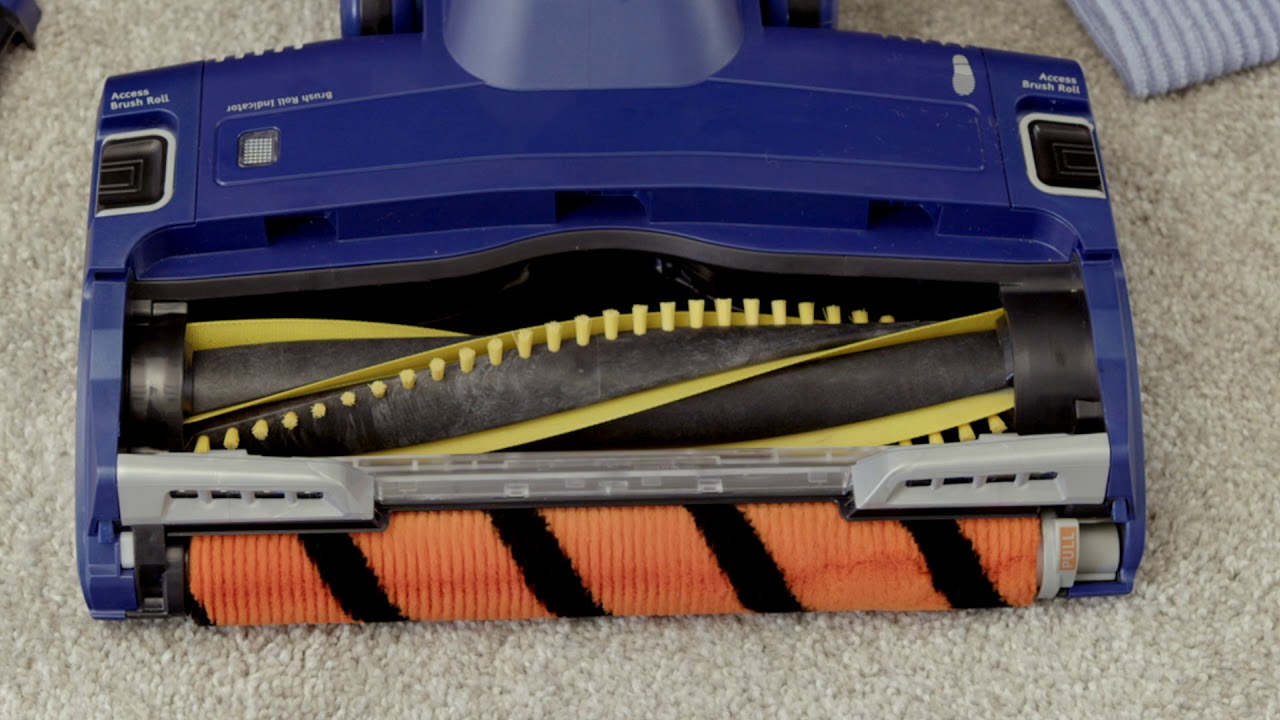
Remove and Clean the Front Soft Roller Brush
Pull the Brush Out Safely
The front soft roller is the only user-removable brush on a Shark DuoClean vacuum. Start by turning the vacuum upside down to access the brush housing. Grip the brush at both ends and pull it straight forward. If it resists, apply a slight twisting motion to release it from the housing. Forcing it can damage the locking tabs.
Once removed, inspect the entire length carefully. Look for wrapped hair at the ends, tangled thread in the bristles, and debris lodged in the center core. This brush captures fine dust and pet hair, so buildup happens quickly, especially in homes with shedding animals.
Cut Away Hair and Fibers
Use scissors to slice through tangled hair and string. Work slowly from one end to the other, pulling loosened material free as you go. Cut only the wrapped fibers, not the soft bristles. For stubborn tangles near the center, switch to fingers once the bulk is cut away.
Spin the brush by hand when finished. It should rotate smoothly with no wobble or resistance. If it sticks, recheck for leftover threads or bent end caps. A freely spinning brush is essential for performance and prevents the brush roll indicator light from triggering.
Reinsert the Brush Correctly
Align both ends of the brush with the slots in the housing. Push straight back until you hear a click on each side. Confirm both sides sit evenly. A misaligned brush won’t spin and may trigger the red indicator light. Test on a hard floor, listening for smooth operation and watching for rotation.
Clean the Rear Self-Cleaning Brush Roll
Access Debris Through the Side Slots
The rear brush roll, also called the Self-Cleaning Brush Roll, is not removable. It uses an anti-hair wrap design, but debris still collects over time. To clean it, locate the narrow openings on either side of the brush housing. These slots provide access to the brush ends where hair wraps most often.
Insert scissors or the cleaning tool included with your vacuum (if available) through the slots. Cut and pull out any visible hair or fibers. Work gently to avoid poking into the motor housing or damaging internal belts. Never use metal tools deeply or try to pry the brush loose. It is not designed to come out, and forcing it can break the mechanism.
Confirm Free Rotation
Spin the rear brush manually through the slots after clearing visible debris. It should turn smoothly. If it resists, hidden debris may sit deeper in the housing. Use a dry cloth wrapped around a thin, non-metal tool (like a chopstick) to wipe around the axle area. Do not apply liquids or compressed air near this section unless your model’s manual specifies otherwise.
If the red brush indicator light stays on after cleaning, place the vacuum on a flat surface and confirm both brushes spin freely. Misalignment or trapped debris in the rear brush housing is a frequent cause.
Empty the Dust Bin After Every Use

Dump Debris Completely
Empty the dust bin after every cleaning session. Press the release button on the handle or bin latch (location varies by model). Hold the bin over a trash can and press the bottom release to drop the contents. Models with a one-touch empty feature should be activated away from your face to avoid a dust cloud.
Never leave debris sitting in the bin overnight. Compacted dust reduces suction and can trigger filter clogs. If you see fine particles escaping from the bin seams, the interior needs cleaning.
Wipe with a Dry Cloth Only
Never wash the dust bin with water. Moisture seeps into seals, damages electronics, and encourages mold growth. Use a dry microfiber cloth or soft-bristle brush to wipe the inside. Pay extra attention to corners, the collar where the filter sits, and the release mechanism.
For stuck-on dust, a can of compressed air works well. Hold the bin upside down and spray short bursts into crevices. Avoid cleaning sprays, as they leave residue that attracts more dust and may degrade plastic over time.
Maintain the HEPA Filter Properly
Tap Out Dust Weekly
The HEPA filter captures fine allergens and dust particles. Remove it from the housing by pressing a tab or lifting it out. Take it to a sink or trash can and tap gently to dislodge loose particles. Do this at least once a week if you vacuum frequently.
Never wash the filter unless your user manual explicitly allows it. Some Shark DuoClean models have washable HEPA filters, while others do not. When in doubt, assume it is not washable. Water destroys the filtration media in non-rinse models.
Rinse Only If Approved and Air Dry 24+ Hours
If your model supports rinsing, use lukewarm water only. Hot water can damage the filter media. Rinse gently under the tap until the water runs clear. Do not scrub, twist, or squeeze the filter. Shake off excess water and place it in a well-ventilated area to dry completely.
Important: Let the filter air dry for at least 24 hours. Never reinstall a damp filter. Moisture damages the motor and reduces suction. Operating the vacuum without a filter or with a wet one can also void the warranty.
Replace the Filter When Worn
HEPA filters generally last 6 to 12 months with regular cleaning. Replace yours if it looks discolored, torn, or no longer traps dust effectively. A failing filter releases allergens back into the air you breathe. Set a calendar reminder to replace it every 8 months if you have pets or allergy sufferers at home.
Prevent Clogs and Blockages
Check for Obstructions Monthly
Even with regular emptying, debris can lodge in the airflow path between the nozzle and the bin. If suction drops suddenly, turn off the vacuum and inspect these areas:
- The intake opening under the brush roll
- The hose, if detachable
- The cyclone chamber inside the bin housing
Use a thin, flexible tool like a pipe cleaner or long brush to clear blockages. Never use a wire hanger, since it can scratch or puncture internal parts.
Use Compressed Air for Hidden Dust
Compressed air works well for blowing dust out of cyclone fins and air channels. Spray in short bursts while holding the bin upside down. This prevents dust from being forced deeper into the unit. Repeat monthly to keep airflow at peak levels.
Avoid spraying motor vents or electronic components. Limit compressed air to the dust bin and intake areas only.
Follow a Simple Maintenance Schedule
After Every Use
- Empty the dust bin
- Wipe the exterior with a dry cloth
- Check the front brush for visible tangles
This 30-second routine prevents buildup and keeps suction strong.
Weekly Tasks
- Tap out the HEPA filter
- Inspect both brush rolls
- Wipe the interior of the dust bin
Add these tasks to your regular cleaning rotation, right alongside emptying the trash or wiping counters.
Monthly Tasks
- Deep clean the front brush roll
- Rinse the HEPA filter (only if your manual allows)
- Use compressed air on the cyclone chamber
- Check the hose and air passages for clogs
Monthly care prevents most performance problems before they start.
Avoid Common Cleaning Mistakes
Never Wash the Dust Bin
This is the single most common mistake. The dust bin is not waterproof. Even a quick rinse traps moisture in seams, leading to mold, odors, and electrical damage. Stick to dry cleaning methods only.
Don’t Force the Rear Brush Out
The rear brush roll is not designed for removal. Pulling it out can break the anti-hair wrap mechanism or damage the drive belt. Clean it only through the access slots on the housing.
Never Reinstall a Wet Filter
A damp HEPA filter restricts airflow and can cause the motor to overheat. Always wait the full 24 hours after rinsing. If you’re unsure whether it’s dry, wait longer. A little patience now prevents costly repairs later.
Troubleshoot Common Issues Fast

Brush Not Spinning
First, check whether the front brush is properly reinserted. Misalignment is the most common cause. If the brush is seated correctly, inspect the belt for wear or slippage. On some models, the belt connects the motor to the brush roll. Replace it if you see cracks or stretching.
Also, make sure the vacuum sits on a flat surface. The brush roll sensor disables spinning when the unit is upright.
Red Light Stays On
This signals a brush roll problem. Turn off the vacuum and follow these steps:
- Remove the front brush and clean it thoroughly
- Clear debris from the rear brush ends through the side slots
- Reinstall everything and test on a hardwood floor
If the light remains on, reset the vacuum by unplugging it for 10 minutes, then try again.
Suction Still Weak
Check three things in order:
- Is the dust bin full?
- Is the filter clogged or damp?
- Is there a blockage in the hose or intake?
Most suction loss comes from a full bin or a dirty filter, not motor failure. Clear each item and retest.
Frequently Asked Questions About Cleaning a Shark DuoClean Vacuum
Can I wash the Shark DuoClean dust bin with water?
No. The dust bin is not designed to be washed. Water can seep into the seals, damage electronics, and promote mold growth. Use a dry microfiber cloth or soft-bristle brush instead, and consider compressed air for stubborn debris.
How often should I clean the HEPA filter on a Shark DuoClean?
Tap out the HEPA filter at least once a week to remove loose dust. If your model allows rinsing, do so monthly and let the filter air dry for 24 hours before reinstalling. Replace the filter every 6 to 12 months, or sooner if it shows damage or reduced performance.
Why is the brush roll indicator light staying on?
A lit brush roll light usually means debris is blocking the brushes or they are not spinning freely. Remove the front brush, clear hair and fibers, and clean the rear brush through the side slots. Make sure the vacuum is on a flat surface and both brushes rotate smoothly when tested.
Is the rear brush roll on a Shark DuoClean removable?
No. The rear Self-Cleaning Brush Roll is not user-removable. It features an anti-hair wrap design, but you can still clean it by accessing the ends through the small slots on the sides of the housing. Use scissors or a soft tool to remove trapped hair.
What should I do if my Shark DuoClean has weak suction?
Start by emptying the dust bin, since a full bin is the most common cause. Next, check and clean the HEPA filter. Finally, inspect the hose, intake opening, and cyclone chamber for blockages. If suction remains weak after these steps, the filter may need replacement.
Can I use cleaning sprays on any part of my Shark DuoClean vacuum?
No. Avoid cleaning sprays, detergents, or chemical solutions on any part of the vacuum. These products leave residue that attracts more dust and can degrade plastic or rubber components over time. Stick to dry cleaning methods for the bin and brushes.
Key Takeaways for Keeping Your Shark DuoClean Vacuum Like New
Regular maintenance is the single biggest factor in vacuum longevity. Focus on three core habits: clean the front soft roller brush weekly, dry-wipe the dust bin after every use, and tap out the HEPA filter on a regular schedule. These three tasks take just minutes and prevent nearly all performance issues.
Avoid the most common mistakes. Never wash the dust bin with water, never try to force out the rear brush roll, and never reinstall a damp filter. These three errors cause the majority of avoidable damage.
Set a reminder on your phone for monthly deep cleaning. A few minutes once a month keeps your vacuum powerful, extends its lifespan, and protects your indoor air quality. Start tonight: empty the bin, check the front brush, and tap out the filter. That’s all it takes to keep your Shark DuoClean running like new.