You spot crumbs under the kitchen table, pet hair on the sofa, or dust on your car dashboard, and you want a quick clean without dragging out a full-size vacuum. A Dyson handheld vacuum is built for exactly these moments. Learning how to use a Dyson handheld vacuum properly helps you get the most suction, longest battery life, and cleanest results from every charge.
This guide walks you through unboxing, charging, attaching tools, cleaning different surfaces, and maintaining your device. By the end, you will know how to handle every common mess with confidence and keep your handheld working like new.
Unbox and Inspect Your Dyson Handheld Vacuum
Before you start cleaning, take a few minutes to set up your vacuum correctly. A quick inspection prevents damage and ensures all parts are ready to use.
Check the Box Contents
Most Dyson handheld vacuums ship with the main motor unit, a wand or extension tool, one or two cleaner heads, a crevice tool, and a charger. Lay everything out and confirm nothing is missing or damaged. Missing parts are easier to replace before you begin.
Inspect Filters and Bins
Look at the filter and dust bin before first use. Some models come with the filter already installed, while others require a quick click into place. Make sure the bin is empty and securely latched to the motor body. A loose bin will reduce suction and may cause debris to escape.
Charge the Battery Before First Use
Your first charge sets the foundation for long-term battery health. Skipping this step can shorten runtime over time.
Locate the Charging Port
The charging port is usually found on the back or bottom of the motor unit. Some models include a wall-mounted dock, while others charge directly through a cable. Plug the charger into a standard wall outlet.
Allow a Full Initial Charge
A full first charge typically takes between 3.5 and 5 hours, depending on your model. Look for a solid or blinking LED light that signals charging status. Wait until the light indicates a full charge before using the vacuum for the first time. This conditions the battery for better long-term performance.
Pro Tip: Avoid using the vacuum while it is plugged in. Running a cordless handheld while charging can damage the battery cells.
Attach the Right Tool for the Job
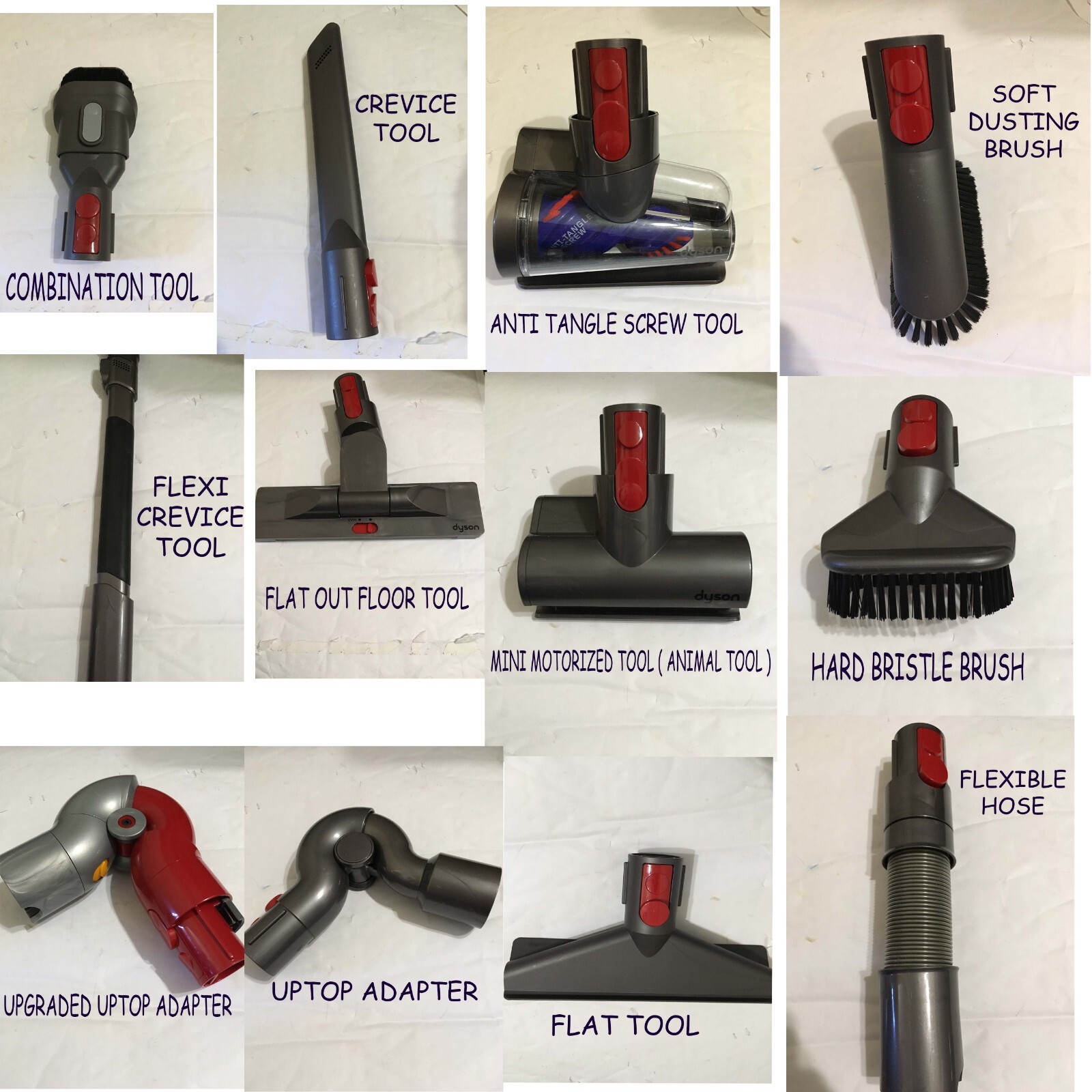
Dyson handheld vacuums work best when you match the attachment to the surface. Using the wrong tool wastes battery and delivers poor results.
Use the Crevice Tool for Tight Spaces
The long, narrow crevice tool is perfect for corners, car seat seams, keyboard gaps, and baseboard edges. Slide it onto the wand or directly onto the motor unit until it clicks. This tool concentrates suction into a thin line, pulling debris from spaces where your fingers cannot reach.
Use the Brush Tool for Upholstery and Fabric
The soft brush tool lifts pet hair, lint, and dust from sofas, curtains, mattresses, and car interiors. Lightly glide the brush across fabric in short strokes. Pressing too hard can press debris deeper into fibers instead of lifting it out.
Use the Motorized Tool for Deeper Cleaning
Some models include a mini motorized brush head that agitates carpet or upholstery fibers. This attachment is ideal for stairs, car floor mats, and small rugs. Turn it on only after it is fully connected to avoid strain on the motor.
Start Cleaning Different Surfaces
Each surface in your home requires a slightly different technique. Adjusting your method protects both the vacuum and the material you are cleaning.
Clean Hard Floors and Tiles
Hold the vacuum at a slight angle and move it slowly across the surface. Quick, choppy movements can scatter lightweight debris. For sticky spots, hover the nozzle above the area for a few seconds to let suction pull up the residue, then pass over again.
Vacuum Stairs and Upholstery
Work from the top of the stairs downward to avoid stepping on debris you just cleaned. On cushions, use short overlapping strokes and lift the vacuum frequently to release suction and prevent fabric from being pulled into the nozzle.
Detail Your Car Interior
Start with the seats using the brush tool, then switch to the crevice tool for seams and vents. Finish by vacuuming the floor mats separately. Removing the mats first gives you better access and prevents the vacuum from bumping into pedals or trim.
Pro Tip: Empty the bin before it reaches the maximum fill line. An overfilled bin blocks airflow and drops suction power within seconds.
Empty the Dust Bin the Right Way
Frequent, proper emptying keeps your vacuum hygienic and powerful. Most Dyson handhelds use a one-touch bin release.
Release the Bin
Hold the vacuum over a trash can and press the bin release button or lever. The bottom of the bin opens, and debris falls out. For finer dust, tap the side of the bin gently to dislodge stuck particles.
Wipe the Bin if Needed
If you notice lingering dust, wipe the inside with a dry cloth. Avoid using water unless your model’s manual specifically states the bin is washable. A damp bin can trap moisture and cause clumping or odor.
Clean and Replace Filters on Schedule
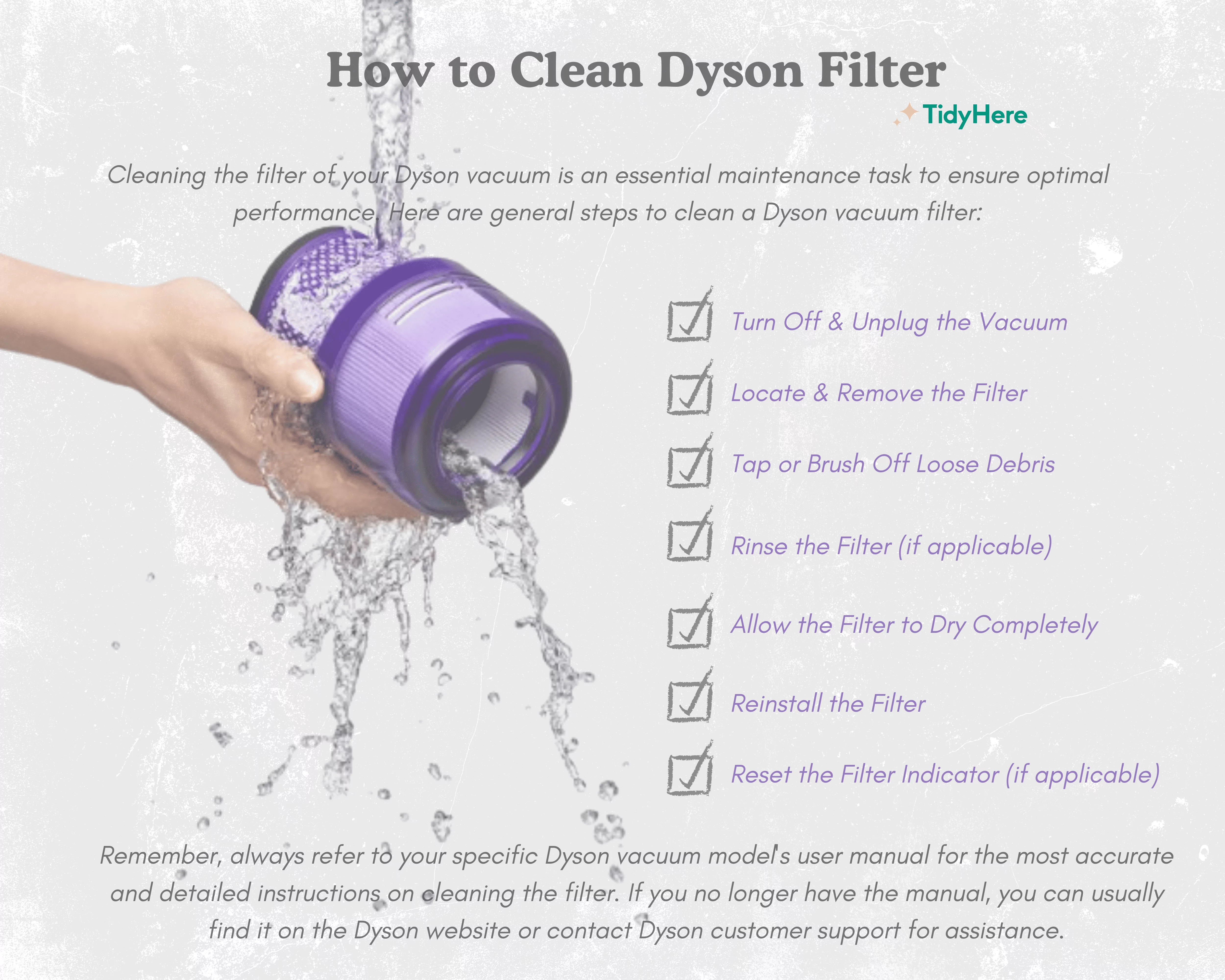
Filters trap fine particles that would otherwise return to the air. A clogged filter reduces suction and strains the motor.
Rinse Washable Filters Monthly
Remove the filter according to your model’s instructions. Rinse it under cold running water until the water runs clear. Do not use soap or detergent. Gently shake out excess water and let the filter air dry completely for at least 24 hours before reinstalling.
Replace Non-Washable Filters
Some older or specialized models use non-washable filters. Replace these every 6 to 12 months, depending on usage. A drop in suction or a musty smell often signals it is time for a new filter.
Store Your Handheld Vacuum Safely
Proper storage protects the battery, keeps attachments organized, and extends the life of your device.
Mount on a Wall Dock
If your model includes a wall mount, install it in a dry, cool area near an outlet. Wall mounting keeps the vacuum charged and ready while saving counter space.
Store in a Dry Location
Avoid leaving the vacuum in hot cars, damp basements, or direct sunlight. Extreme temperatures degrade battery cells and can warp plastic components over time.
Troubleshoot Common Dyson Handheld Problems
Even with great care, issues can appear. Here is how to handle the most common complaints.
Suction Feels Weak
A weak suction issue usually points to a full bin, clogged filter, or blocked nozzle. Empty the bin, rinse the filter, and check the wand and tool for obstructions. Most suction problems clear up after these three steps.
Vacuum Will Not Turn On
If the vacuum does not power on, confirm the battery is fully charged. Check that the bin and filter are properly seated, since many models include a safety shutoff when parts are missing. Try a different outlet if charging does not start.
Brush Bar Stops Spinning
Hair and threads can wrap around the brush bar and stop rotation. Remove the brush head, cut away tangled fibers with scissors, and press the reset button if your model has one. Test the brush again before reassembling.
Frequently Asked Questions About Dyson Handheld Vacuums
How long does a Dyson handheld vacuum battery last on a full charge?
Most Dyson handheld vacuums run between 20 and 40 minutes per charge, depending on the model, the tool used, and the cleaning mode. Motorized tools and higher power settings drain the battery faster than the crevice tool on standard mode.
Can I use a Dyson handheld vacuum on hardwood floors?
Yes, Dyson handheld vacuums work well on sealed hardwood, tile, and laminate. Use the soft brush tool or the standard nozzle without the brush bar engaged to avoid scratching delicate finishes. Always check that wheels or brush bristles are clean before gliding across wood.
How often should I empty the dust bin?
Empty the bin after every use for best results, especially when vacuuming fine dust or pet hair. Allowing debris to pile up reduces suction and may cause clogs in the cyclone or filter area.
Is it safe to wash the filter with soap?
No, only rinse washable Dyson filters under cold water without soap or detergent. Soap can leave residue that blocks airflow and damages the filter media. Let the filter dry fully for 24 hours before reinstalling.
Can I leave my Dyson handheld vacuum on the charger all the time?
Most modern Dyson handhelds include battery protection that prevents overcharging. Still, unplugging once the battery is full and recharging only when needed helps maximize long-term battery health.
What is the best attachment for pet hair?
The mini motorized brush head is the strongest tool for pet hair on upholstery, stairs, and car seats. The soft brush tool also works well for quick cleanups on clothing, curtains, and cushions where you do not want aggressive agitation.
Key Takeaways for Using a Dyson Handheld Vacuum
A Dyson handheld vacuum is a powerful tool when you use it with the right technique. Charge the battery fully before first use, match each attachment to the surface you are cleaning, and empty the bin after every session. Rinse the filter monthly and store the vacuum in a cool, dry place to keep it running at peak performance.
Your next step is simple: grab your Dyson handheld, run through this checklist once, and put it to work on the mess you have been putting off. A few small habits today will keep your vacuum strong for years to come.