Is your vacuum no longer picking up debris like it used to? Does the roller brush stay still even when the motor runs? These are classic signs of a worn or broken vacuum belt. The belt transfers power from the motor to the roller brush, and when it fails, cleaning performance drops fast. Knowing how to check a vacuum belt can save you time, money, and the frustration of ineffective cleaning. In this guide, you will learn how to safely inspect the belt, identify common signs of damage, and decide whether it needs replacement, all in under 15 minutes. No special tools are needed beyond a simple screwdriver, and the process works for most upright vacuums, including PowerForce® and similar models.
Prepare the Vacuum for a Safe Inspection
Before checking the belt, safety comes first. A running vacuum motor can cause serious injury if you access it incorrectly.
Turn Off and Unplug the Vacuum
Always switch the vacuum off and unplug it from the wall outlet. Never attempt to inspect internal parts while the unit has power.
Let the Vacuum Cool Down
If the vacuum was recently in use, wait 10 to 15 minutes for internal components to cool. A hot motor or belt housing can cause burns when touched.
Clear and Light Your Work Area
Place the vacuum on a flat, well-lit surface. Make sure you have enough space to remove screws and set the bottom plate aside without losing small parts.
Remove the Bottom Plate
You need to open the vacuum housing to reach the belt. The bottom plate covers the roller brush and belt assembly.
Use the Correct Screwdriver
Grab a Philips screwdriver. Most upright vacuums, including PowerForce® models, use Phillips-head screws to hold the bottom plate in place.
Unscrew and Lift Off the Plate
Remove every screw around the perimeter of the plate. Keep them in a small dish so they do not roll away. Gently lift the plate straight off to expose the roller brush and belt.
Pro Tip: Take a photo of the vacuum before removing the plate. It helps during reassembly by showing how each part aligns.
Locate and Inspect the Belt

With the plate off, the belt should be visible around the roller brush and motor shaft.
Identify Where the Belt Sits
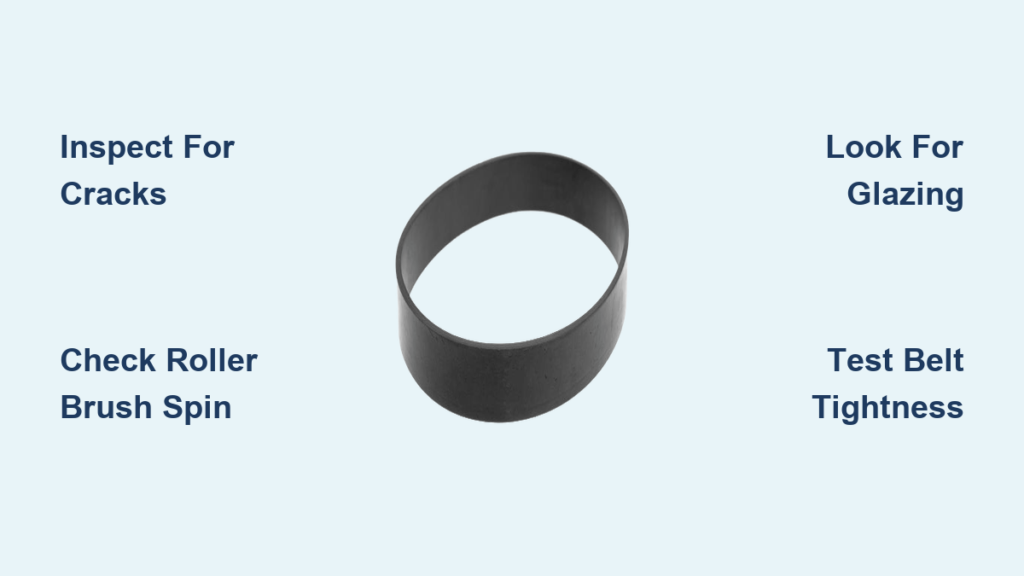
The belt runs from the motor drive shaft to the roller brush, connecting the two like a small rubber band. It should sit snugly in the center groove of the brush roller.
Look for Common Signs of Damage
Inspect the belt carefully for any of these warning signs:
- Cracks or fraying along the edges
- Melting or glazing, which appears as a shiny, hardened surface
- Snapping or visible separation
- Stretching, where the belt feels loose or slips easily
Expert Note: Even if the belt is not broken, visible wear means it is nearing failure. Replace it proactively to avoid sudden breakdowns mid-cleaning.
Check the Roller Brush Movement
A simple movement test can confirm whether the belt is doing its job.
Spin the Roller Brush by Hand
With the belt in place, try rotating the roller brush. It should turn smoothly without grinding or sticking.
Watch for Resistance or Noise
If the brush is hard to turn, the bearings may be worn, or debris could be tangled in the brush ends. Clean both ends and check for hair or string wrapped around the shaft.
Common Mistake: Forcing a stuck brush can damage a new belt during installation. Always clear obstructions before fitting a replacement.
Remove the Old Belt if a Replacement Is Needed
If the belt shows damage, remove it carefully before installing a new one.
Slide the Belt Off the Motor Shaft
Gently pull the belt off the metal motor shaft. It may feel tight if it is still intact.
Lift the Belt Off the Roller Brush
Stretch the belt off the roller brush end, taking care not to bend or damage the brush bearings.
Warning: Never cut the belt unless it is absolutely necessary. Snapping it can send rubber flying and damage nearby components.
Install the New Belt Correctly
Use the correct replacement belt for your specific model. Check your vacuum manual or the manufacturer website to confirm the part number.
Loop the Belt Around the Motor Shaft First
Place the new belt over the motor drive shaft. Starting here makes it easier to position the roller brush correctly afterward.
Stretch the Belt Onto the Roller Brush
Align the roller brush and stretch the belt over one end, then roll it into place. Make sure the belt sits centered in the brush groove.
Pro Tip: Rotate the brush slightly to help the belt seat fully. Avoid over-stretching, which can weaken the rubber and shorten the belt’s life.
Reassemble the Vacuum and Test It
Once the belt is in place, reattach the bottom plate and run a quick test.
Reattach the Bottom Plate
Align the plate carefully. Misalignment can pinch the belt or roller brush. Reinsert and tighten all screws evenly.
Power On and Observe the Brush
Plug in the vacuum and turn it on. Watch the roller brush through any plate window or listen for a steady spinning sound.
What a Healthy Belt Sounds Like
A working belt produces a smooth, consistent hum with no squealing, burning smell, or grinding noise. The brush should start rotating the moment you power the vacuum on.
Troubleshooting Tip: If the brush does not spin, turn off the vacuum and recheck the belt alignment. It may have slipped off the shaft during startup.
Prevent Future Belt Problems
Regular maintenance keeps your vacuum running efficiently and extends the life of every belt you install.
Clean the Roller Brush After Each Use
Remove hair, string, and debris from the roller brush weekly. Buildup increases strain on the belt and causes premature wear.
Avoid Vacuuming Large Debris
Do not vacuum large objects like coins, paper clips, or thick cords. These items can jam the brush and snap the belt in an instant.
Replace Belts on a Schedule
Even with perfect care, belts wear out every 6 to 12 months with regular use. Replacing them annually prevents sudden failures during cleaning sessions.
Frequently Asked Questions About Checking Vacuum Belts
Why does my vacuum belt keep breaking?
Frequent breakage usually comes from a jammed or tangled roller brush, the wrong belt type, over-tightening during installation, or suction blockages that force the motor to strain. Fix the root cause before installing a new belt.
Can I check the belt without any tools?
Most upright vacuums require removing screws to access the belt. However, some models feature tool-free access panels, so check your owner’s manual for details.
How tight should a vacuum belt be?
The belt should feel snug but not overly tight. It should resist twisting by finger yet rotate freely when the motor runs.
What if the belt looks fine but the brush still will not spin?
Check for a worn or seized roller brush bearing, debris blocking brush movement, a damaged motor shaft, or a faulty drive coupling. Inspect each part before assuming the motor is the problem.
How often should I inspect the belt?
Check the belt every 3 to 6 months, especially if you notice reduced suction or weak brush rotation. Catching wear early prevents mid-cleaning breakdowns.
Key Takeaways for Checking Your Vacuum Belt
Checking your vacuum belt is one of the easiest and most impactful maintenance tasks you can perform. A worn belt reduces cleaning efficiency and can damage the motor and roller brush over time. By inspecting the belt every few months and replacing it at the first sign of wear, you keep your vacuum running like new. Always use manufacturer-recommended belts, since cheap imitations often fail prematurely. If performance still suffers after a new belt, check for clogs, dirty filters, or suction leaks elsewhere in the machine.
Now that you know how to check a vacuum belt, you are equipped to maintain peak performance and extend your vacuum’s lifespan without calling a technician. Set a reminder today to inspect your belt and stock a spare so you are never caught off guard.