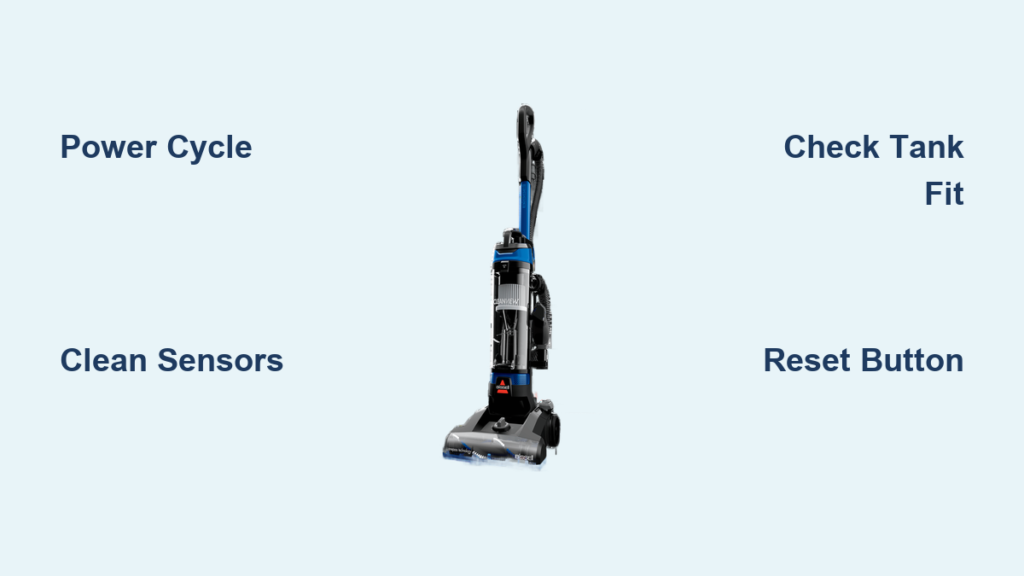
Few things are more frustrating than a vacuum that refuses to cooperate mid-clean. If your Bissell is flashing mystery lights, ignoring the power button, or insisting the tank is full when you just emptied it, a reset is often all it takes. Learning how to reset a Bissell vacuum is simpler than most people think, and it usually takes less than 15 minutes. This guide covers the universal reset process, model-specific tips, and what to do when a reset doesn’t solve the problem.
Find Your Bissell Model Number First
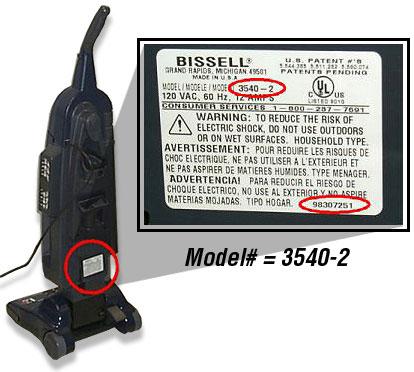
Check the White Label on Your Machine
Every effective reset starts with knowing your exact model. Bissell prints the model number on a white label placed in a few predictable spots. Look on the lower back, the bottom of the unit, or behind the cleaning tanks.
If you own a Lift-Off model, the detachable pod must be removed to reveal the label tucked underneath. Skipping this step often leads to guesswork, and applying the wrong fix can waste time or even make things worse.
Use the Item Number on Cleaning Formulas
For those using Bissell cleaning solutions, the item number is printed on the back of the bottle near the bottom. This number helps identify which system you’re working with and is useful when contacting support. Different Bissell models have unique electronics, so confirming your model ensures you follow the correct reset sequence.
Start with a Basic Electrical Reset
Power Down and Disconnect
The most reliable way to reset any Bissell vacuum is a full electrical reset. Start by switching the unit off. Corded models should be unplugged from the outlet, while cordless units need the battery removed if it’s accessible.
This step cuts power to the internal circuits and allows capacitors to fully discharge. Wait at least 5 to 10 minutes before reconnecting anything. Rushing this pause is a common reason resets fail the first time.
Restore Power and Test
Plug the unit back in or reinstall the battery, then press the power button. Watch closely for changes:
- Do the error lights clear?
- Does suction return to normal?
- Does the unit power on at all?
If yes, the reset worked. If not, it’s time to try model-specific solutions.
Try a Soft Reset Through Power Cycling
Turn Off, Wait, and Restart
A soft reset works for minor glitches like frozen controls or flickering lights. Hold the power button until the vacuum shuts off completely, wait about 10 seconds, then power it back on.
Repeating this cycle 2 to 3 times can help if the first attempt doesn’t take. Power surges or sudden shutdowns often leave sensors confused, and a few quick cycles help the system recalibrate.
When This Method Works Best
Power cycling is ideal for:
- Flashing indicator lights with no clear cause
- Brief loss of suction
- Unresponsive buttons after charging
This won’t fix hardware damage, but it clears temporary sensor miscommunications that mimic serious faults.
Check for a Hidden Reset Button
Look for a Pinhole on the Unit
Some Bissell models include a small pinhole reset button, usually near the power cord inlet or on the bottom panel. If you find one, press and hold it for 5 to 10 seconds using a straightened paperclip. A slight click confirms the press.
Important: Not every Bissell has this button. Its presence depends on the model and production year. Newer smart models often rely on software resets through power cycling rather than a physical button.
Verify Before You Press
If you can’t find a pinhole, don’t force anything. Rely on the power cycle method instead. Forcing a non-existent button can damage the casing or internal components.
Troubleshoot CrossWave HF3 Sensor Errors
Address False “Tank Full” Alerts
The Bissell CrossWave HF3 has a known issue where the dirty water tank full/missing light flashes even on an empty, properly seated tank. This typically appears during first use and points to a sensor calibration glitch.
To clear it:
1. Remove the dirty water tank completely
2. Inspect the sensor area on the machine base for hair, residue, or debris
3. Wipe the contacts with a dry cloth or one slightly dampened
4. Reinsert the tank firmly until it clicks
Dirty or misaligned sensors are the most common cause of false alerts on this model.
Complete a Full System Reboot
After cleaning the sensor, turn the unit off and unplug it from the charger. Wait a full 10 minutes to let the system fully discharge, then plug it back in and power on. This extended reboot often clears stubborn CrossWave errors. If the light returns, the owner’s manual may have model-specific diagnostics worth checking.
Verify Tank Installation and Sensor Health

Make Sure Tanks Click Into Place
Even slight misalignment triggers “missing tank” or “tank full” warnings. When reinstalling:
- Align the tank guides with the slots in the base
- Push down firmly until you hear a click
- Never force the tank; check for obstructions if it won’t seat
For multi-tank models like the Lift-Off, both clean and dirty water tanks must be installed correctly.
Clean the Sensor Contacts Weekly
Residue from cleaning formulas builds up on the metal or plastic sensor contacts over time. Wipe them weekly with a dry microfiber cloth. For stubborn buildup, dampen the cloth with white vinegar, then dry thoroughly. Clean contacts prevent false error signals that send you searching for a reset in the first place.
Know When to Contact Bissell Support
Signs You Need Professional Help
Not every issue is fixable at home. Reach out to Bissell if:
- The vacuum still won’t power on after a full reset
- Error lights return immediately after tank reseating
- You see visible damage to the cord, battery, or housing
- The unit is under warranty
Having your model number, purchase date, and a clear description of the problem ready speeds up the process dramatically.
Prep Before You Call
Before contacting support, gather this information:
- Your model number
- The exact behavior (such as “blue light flashes three times”)
- Every troubleshooting step you’ve already tried
- Whether you have the owner’s manual
Support agents resolve issues faster when you arrive prepared.
Prevent the Need for Future Resets
Keep Sensors and Tanks Clean
Most reset situations are preventable with simple maintenance. After every use:
- Empty both tanks completely
- Rinse the dirty water tank and let it dry
- Wipe the sensor contacts on the machine and tank
A quick post-clean routine eliminates most false alerts before they start.
Store Smart and Protect Against Surges
Keep your Bissell in a dry, cool location away from direct sunlight. Plug it into a surge protector to guard against electrical spikes that can corrupt internal circuits. For cordless models, avoid leaving them on the charger indefinitely. Overcharging degrades the battery and can trigger system errors over time.
Frequently Asked Questions About Resetting a Bissell Vacuum
Do all Bissell vacuums have a reset button?
No. Bissell does not include a universal reset button across its product line. Some older or higher-end models feature a small pinhole reset, but most rely on power cycling and sensor cleaning for resets. Check your model’s manual or the bottom panel to confirm whether a pinhole exists.
How long should I wait when power cycling my Bissell?
Wait at least 5 to 10 minutes during a full electrical reset. This pause allows internal capacitors to fully discharge and clears temporary electronic glitches. Shorter waits often result in incomplete resets and recurring issues.
Why does my CrossWave HF3 keep showing a full tank warning?
This is a documented sensor calibration issue, especially during first use. The dirty water tank sensor can misread even when the tank is empty and properly seated. Cleaning the sensor contacts and performing a full 10-minute power cycle usually clears the error.
Can I reset a Bissell without unplugging it?
A soft reset through power cycling (turning the unit off and on) works for minor glitches. However, a full electrical reset requires unplugging corded models or removing the battery from cordless ones. Unplugging ensures all internal circuits fully discharge.
Will resetting my Bissell void the warranty?
Performing a standard power cycle or cleaning sensor contacts does not void the warranty. However, disassembling the unit beyond basic maintenance steps could affect warranty coverage. When in doubt, contact Bissell support before attempting any internal repairs.
What information should I have ready before calling Bissell support?
Have your model number, purchase date, and a clear description of the issue ready. Note the exact behavior, such as which lights flash and how often, plus every troubleshooting step you’ve already tried. Mention whether you have the owner’s manual, as this helps agents diagnose the problem faster.
Key Takeaways for Resetting Your Bissell Vacuum
Resetting a Bissell vacuum comes down to three core steps: identify your model, perform a full power cycle with a 5 to 10 minute wait, and clean the sensor contacts if error lights persist. The CrossWave HF3’s “tank full” glitch responds well to sensor cleaning plus a complete reboot. When standard methods fail, having your model number and troubleshooting history ready makes support calls far more productive. Start with the basics, maintain your unit regularly, and your Bissell should run smoothly without frequent resets.